Compute Need to Know
Login Nodes
Node names: ahl0[1-4] e.g., ahl01
Login nodes are the ‘front door’ into compute resources. They are intended for
Creating a new remote connection to MSI systems
Performing data transfer from a local machine using SFTP, scp or other supported data transfer protocol
Navigating file system such as interacting with Tier 1 and Tier 2 storage
Interfacing with the Slurm scheduler such as submitting jobs and checking their status
They are not intended for
Heavy compute - Processes that exceed the threshold will have their process killed after 15 minutes automatically
Installation of ‘large’ packages - some package installations rely on temp disk; users are advised to create an interactive session using srun and request temp disk using the
--temp <amount>GB
Compute Nodes
Node names include, but are not limited to: acn*, aga*, cn*, n*
Compute resources are available to all users by default. Our Partitions page has information on the names of the partitions and the per partition limitation such as max number of nodes per job, max walltime and max number of jobs per user.
Maintenance Periods
At MSI there are monthly planned maintenance days wherein operations staff will apply systems changes and planned updates. The maintenance period (M-day) typically takes place the first Wednesday of the month starting at 5 AM and ending at around 5PM the same day. Information on the upcoming maintenance day is available on our Status Page
User communications are sent out ahead of the maintenance period with information on any user facing changes.
2026 Maintenance Days
01/07/26 January
02/04/26 February
03/04/26 March
04/01/26 April
05/06/26 May
06/03/26 June
07/01/26 July
08/05/26 August
09/02/26 September
10/07/26 October
11/04/26 November
12/02/26 December
01/06/27 January
Leading up to M-Day:
As mentioned above, the maintenance window starts at 5am, this means that jobs that request a walltime that would run past the start of the window will be held in queue with a reason similar to ‘Reserved for maintenance…’.
Jobs may be resubmitted with a shorter walltime in order to become eligible to run.
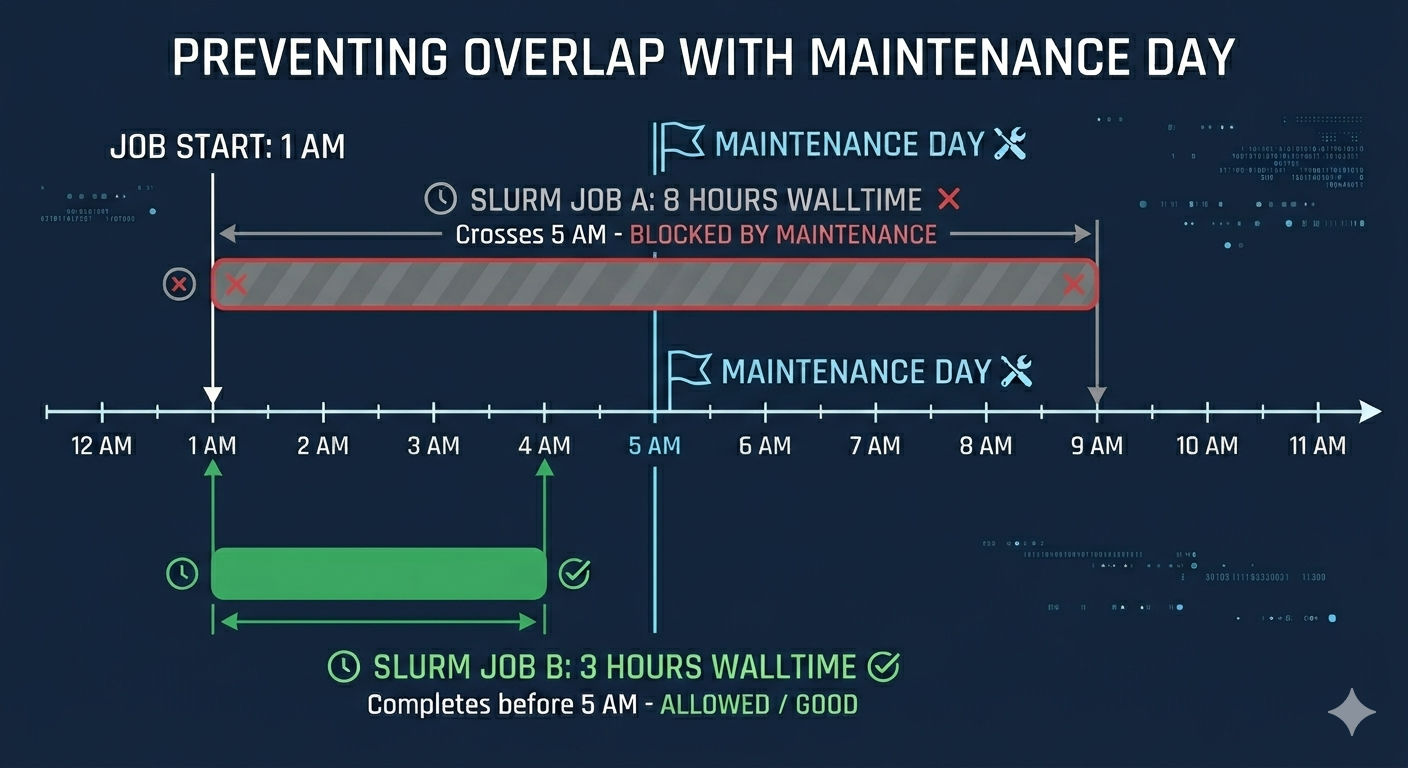
The remaining hours before the next M-Day can be determined with this command template. Enter this into any remote shell on MSI.
bc <<< "($(date -d '<date of next maintenance> 05:00' +%s) - $(date +%s)) / 3600"

-- Example
14:06:51 [vega0051@ahl02 ~ ]$ bc <<< "($(date -d '2026-05-06 05:00' +%s) - $(date +%s)) / 3600"
278
During Maintenance Day :
The job scheduler is suspended, no jobs will run.
This suspension also applies to private partitions.
New jobs may be submitted but will similarly be held until the scheduler is resumed after the maintenance period is complete.
User Resource Limits
Agate is a shared compute environment with limits per compute resource, user, and groups. These are the current user limits to consider when expanding a workflow.
Per user job limits |
Max Jobs |
|---|---|
All Partitions |
5000 |
interactive |
1 |
interactive-gpu |
1 |
There are also limits to the number of individual jobs that can be placed into the queue. A user may submit within the rate specified below. If the limit is met, users will need to wait for a cool down period before being able to place additional jobs.
While job arrays have a high index limit, job steps are still limited by the max number of jobs per hour.
Max Values |
Count |
|---|---|
Jobs per Hour |
5000 |
Job Array index |
100,001 |
Compute Resource Limits
The Agate cluster is divided up into individual partitions that have a set of compute resources associated. Information on the existing partitions can be found on our Partitions page.
Handling Hardware Issues
Occasionally, compute resources may encounter issues that would prevent them from being able to perform as expected. To address this our operations staff have a Node Health Check (NHC) process that is executed on each node. This process is executed in a 15 minute interval to review the nodes vitals. Should a node fail to pass the NHC, it is automatically marked as ‘DRAIN’ and scheduled for reboot.
During this drain state, existing job will continue running and the scheduler will avoid placing new jobs on the node until after the node returns to service.