BeeOND on Agate
Compute nodes on MSI systems have access to primary storage, global scratch, and local scratch disk. On occasion, there are workloads that demand more scratch disk than is available on a single node. If this is the case, a researcher can use the global scratch or BeeOND. Global scratch has the most space available, but can suffer from variable performance because it is a shared resource. In this case, you might want to consider using BeeOND.
BeeOND establishes an ephemeral BeeGFS distributed filesystem by aggregating the local scratch on all the nodes used by your job. It is generally suggested that you request at least 12 nodes as in the example below. Please also note that you should request all the resources on the nodes. In the example below, we’re using Agate nodes set to 480G and 800G, and select the msilarge partition.
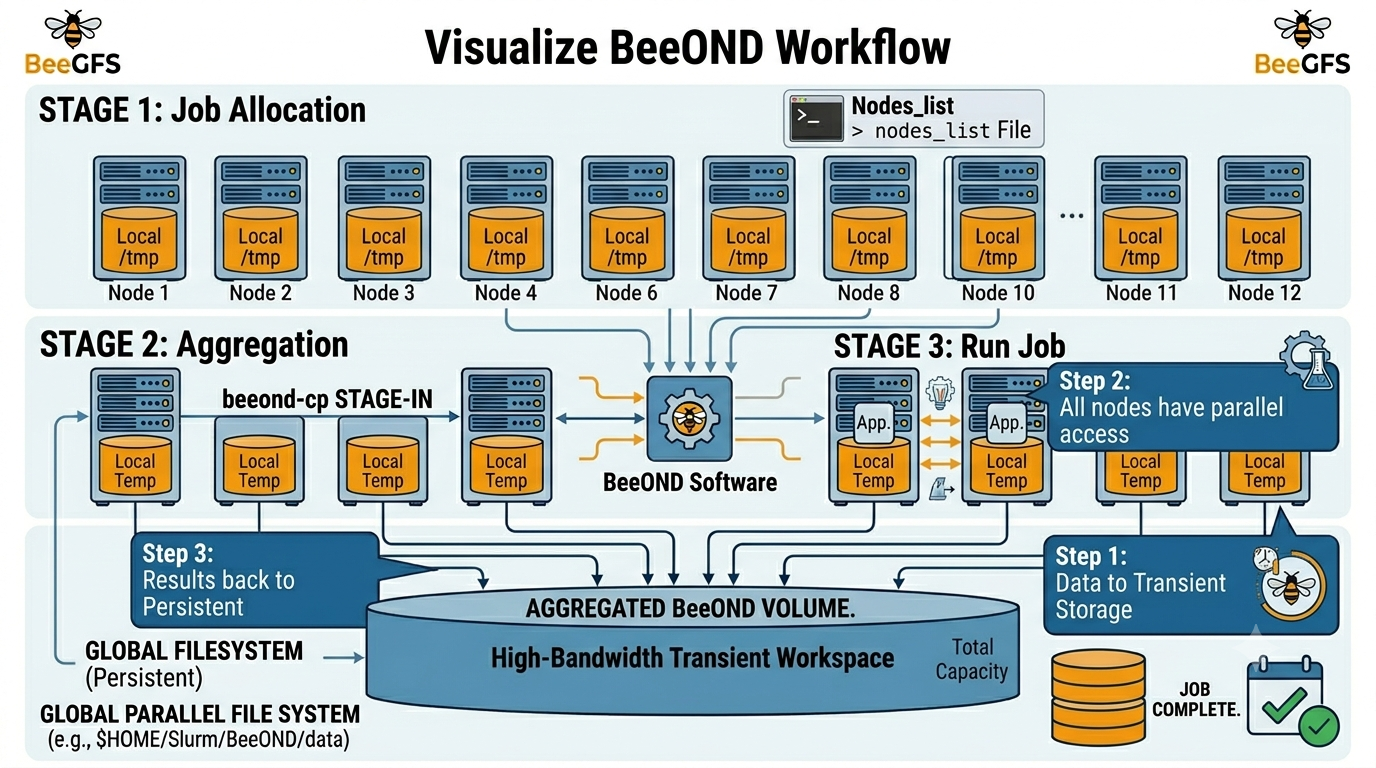
Example job script to set up BeeOND
#!/bin/bash -l

#SBATCH -C beeond
#SBATCH -N 12
#SBATCH -n 24
#SBATCH --mem 480G
#SBATCH --tmp 800G
#SBATCH -p msilarge

#SBATCH --mail-type=BEGIN,FAIL
#SBATCH --mail-user=<UMN email>

#SBATCH -e beeondjob-%j.err
#SBATCH -o beeondjob-%j.out

cd $SLURM_SUBMIT_DIR

WORKING_DIR=$HOME/Slurm/BeeOND
MY_DATA_DIR=$HOME/Slurm/BeeOND/data #source data to be ‘stagein’
BEEOND_DIR=/tmp #a beegfs mounted space pooled from all nodes

# Generate a node list file

scontrol show hostname > ${WORKING_DIR}/nodes_list
    if [[ $? != 0 ]]; then
        echo "Fail to create nodes_list"
    else
        echo "nodes list"
        cat ${WORKING_DIR}/nodes_list
    fi


# Move data to beeond space using BeeOND stage in
beeond-cp stagein -n ${WORKING_DIR}/nodes_list -g  ${MY_DATA_DIR} -l
${BEEOND_DIR}
    if [[ $? != 0 ]]; then
        echo "Fail beeond-cp stagein"
    else
        echo "beeond-cp stagein completed"
    fi

# Run some applications

# Move data out to my own space using BeeOND stage out
beeond-cp stageout -n ${WORKING_DIR}/nodes_list -g  ${MY_DATA_DIR} -l
${BEEOND_DIR}
    if [[ $? != 0 ]]; then
        echo "Fail beeond-cp stageout"
    else
        echo "beeond-cp stageout completed"
    fi